

The slice() method returns a shallow copy of a portion of an array into a new array object selected from start to end (end not included) where start and end represent the index of items in that array. The original array will not be modified.
1. Создадим массив из массива начиная с n позиции в массиве. Например, мы хотим начать использовать список с 3 элемента
const animals = ['ant', 'bison', 'camel', 'duck', 'elephant'];

console.log(animals.slice(2));
// expected output: Array ["camel", "duck", "elephant"]
Или, например, мы хотим взять последние 2 элемента из списка
const animals = ['ant', 'bison', 'camel', 'duck', 'elephant'];

console.log(animals.slice(-2));
// expected output: Array ["duck", "elephant"]
2. Клонирование массива. Иногда нужно получить копию массива без ссылок, просто используем slice без аргументов
const animals = ['ant', 'bison', 'camel', 'duck', 'elephant'];
console.log(animals.slice());

// expected output: Array ['ant', 'bison', 'camel', 'duck', 'elephant']
Изменения в копии не приведут в изменении в основном массиве
3. Преобразования массиво-подобных объектов в массив
function argToArray(){
 return Array.prototype.slice.call(arguments);
}

console.log(aargToArray("1", "2", "3", "4"));
// expected output: Array ["1", "2", "3", "4"]
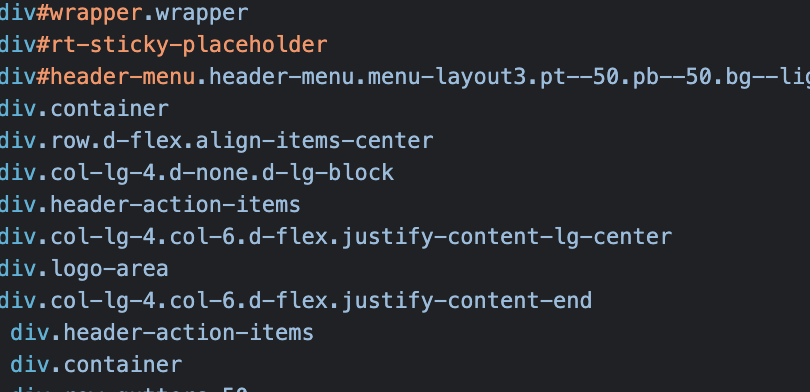
4. Преобразовать NodeList из DOM в массив
const allDiv = document.querySelectorAll(‘div’);
console.log(Array.prototype.slice.call(allDiv));
expected output:
5. Заменить элемент в строке по индексу
String.prototype.append = function (index,value) {
 return this.slice(0,index) + value + this.slice(index);
};

const person = "Captain Sparrow";
console.log(person.append(8,"Jack "));

expected output: String Captain Jack Sparrow


![<blockquote>The slice() method returns a shallow copy of a portion of an array into a new array object selected from start to end (end not included) where start and end represent the index of items in that array. The original array will not be modified.</blockquote><h3>1. Создадим массив из массива начиная с n позиции в массиве. Например, мы хотим начать использовать список с 3 элемента</h3><pre class="ql-syntax" spellcheck="false"><span class="hljs-keyword">const</span> animals = [<span class="hljs-string">'ant'</span>, <span class="hljs-string">'bison'</span>, <span class="hljs-string">'camel'</span>, <span class="hljs-string">'duck'</span>, <span class="hljs-string">'elephant'</span>];
<span class="hljs-variable language_">console</span>.<span class="hljs-title function_">log</span>(animals.<span class="hljs-title function_">slice</span>(<span class="hljs-number">2</span>));
<span class="hljs-comment">// expected output: Array ["camel", "duck", "elephant"]</span>
</pre><p><span class="hljs-comment">Или, например, мы хотим взять последние 2 элемента из списка</span></p><pre class="ql-syntax" spellcheck="false"><span class="hljs-keyword">const</span> animals = [<span class="hljs-string">'ant'</span>, <span class="hljs-string">'bison'</span>, <span class="hljs-string">'camel'</span>, <span class="hljs-string">'duck'</span>, <span class="hljs-string">'elephant'</span>];
<span class="hljs-variable language_">console</span>.<span class="hljs-title function_">log</span>(animals.<span class="hljs-title function_">slice</span>(-<span class="hljs-number">2</span>));
<span class="hljs-comment">// expected output: Array ["duck", "elephant"]</span>
</pre><h3>2. Клонирование массива. Иногда нужно получить копию массива без ссылок, просто используем slice без аргументов</h3><pre class="ql-syntax" spellcheck="false">const animals = [<span class="hljs-string">'ant'</span>, <span class="hljs-string">'bison'</span>, <span class="hljs-string">'camel'</span>, <span class="hljs-string">'duck'</span>, <span class="hljs-string">'elephant'</span>];
console.log(animals.<span class="hljs-built_in">slice</span>());
// expected output: Array [<span class="hljs-string">'ant'</span>, <span class="hljs-string">'bison'</span>, <span class="hljs-string">'camel'</span>, <span class="hljs-string">'duck'</span>, <span class="hljs-string">'elephant'</span>]
</pre><p>Изменения в копии не приведут в изменении в основном массиве</p><h3>3. Преобразования массиво-подобных объектов в массив</h3><pre class="ql-syntax" spellcheck="false"><span class="hljs-keyword">function</span> <span class="hljs-title function_">argToArray</span>(){
<span class="hljs-keyword">return</span> <span class="hljs-title class_">Array</span>.<span class="hljs-property"><span class="hljs-keyword">prototype</span></span>.<span class="hljs-property">slice</span>.<span class="hljs-title function_">call</span>(<span class="hljs-variable language_">arguments</span>);
}
<span class="hljs-variable language_">console</span>.<span class="hljs-title function_">log</span>(<span class="hljs-title function_">aargToArray</span>(<span class="hljs-string">"1"</span>, <span class="hljs-string">"2"</span>, <span class="hljs-string">"3"</span>, <span class="hljs-string">"4"</span>));
<span class="hljs-comment">// expected output: Array ["1", "2", "3", "4"]</span>
</pre><h3>4. Преобразовать NodeList из DOM в массив</h3><pre class="ql-syntax" spellcheck="false"><span class="hljs-keyword">const</span> allDiv = <span class="hljs-variable language_">document</span>.<span class="hljs-title function_">querySelectorAll</span>(‘div’);
<span class="hljs-variable language_">console</span>.<span class="hljs-title function_">log</span>(<span class="hljs-title class_">Array</span>.<span class="hljs-property"><span class="hljs-keyword">prototype</span></span>.<span class="hljs-property">slice</span>.<span class="hljs-title function_">call</span>(allDiv));
</pre><p>expected output:</p><p><img src="/uploads/brochures/post_inner/image-61961587bd57c.png"></p><h3>5. Заменить элемент в строке по индексу</h3><pre class="ql-syntax" spellcheck="false"><span class="hljs-title class_">String</span>.<span class="hljs-property"><span class="hljs-keyword">prototype</span></span>.<span class="hljs-property">append</span> = <span class="hljs-keyword">function</span> (<span class="hljs-params">index,value</span>) {
<span class="hljs-keyword">return</span> <span class="hljs-variable language_">this</span>.<span class="hljs-title function_">slice</span>(<span class="hljs-number">0</span>,index) + value + <span class="hljs-variable language_">this</span>.<span class="hljs-title function_">slice</span>(index);
};
<span class="hljs-keyword">const</span> person = <span class="hljs-string">"Captain Sparrow"</span>;
<span class="hljs-variable language_">console</span>.<span class="hljs-title function_">log</span>(person.<span class="hljs-title function_">append</span>(<span class="hljs-number">8</span>,<span class="hljs-string">"Jack "</span>));
expected <span class="hljs-attr">output</span>: <span class="hljs-title class_">String</span> <span class="hljs-title class_">Captain</span> <span class="hljs-title class_">Jack</span> <span class="hljs-title class_">Sparrow</span>
</pre><p><br></p>](
/uploads/brochures/post_sidebar/8qnusvf58eltoxk65vxy-61968b399f1c5.jpg?v=1.11)
![<p>Короткая история как получить доступ к переменной php, если ее зона видимости ограничена без ReflectionMethod<span style="color: rgb(230, 0, 0);">*</span> магии.</p><blockquote><strong>public</strong> - Class members declared public can be accessed everywhere.</blockquote><blockquote><strong>protected</strong> - Class members declared protected can be accessed only within the class itself and by inheriting and parent classes.</blockquote><blockquote><strong>private</strong> - Class members declared as private may only be accessed by the class that defines the member.</blockquote><p><strong><u>Важно</u></strong>, объекты одного типа будут иметь доступ к свойствам друг друга вне зависимости от их зоны видимости даже если они инициализированы в разных местах</p><p>Создадим класс с private свойством и получим доступ к нему:</p><pre class="ql-syntax" spellcheck="false"><span class="hljs-meta"><?php</span>
<span class="hljs-class"><span class="hljs-keyword">class</span> <span class="hljs-title">Test</span>
</span>{
<span class="hljs-keyword">private</span> <span class="hljs-variable">$secret</span>;
<span class="hljs-keyword">public</span> <span class="hljs-function"><span class="hljs-keyword">function</span> <span class="hljs-title">__construct</span>(<span class="hljs-params"><span class="hljs-keyword">string</span> <span class="hljs-variable">$secret</span></span>)
</span>{
<span class="hljs-keyword">$this</span>->secret = <span class="hljs-variable">$secret</span>;
}
<span class="hljs-keyword">public</span> <span class="hljs-function"><span class="hljs-keyword">function</span> <span class="hljs-title">access</span>(<span class="hljs-params">Test <span class="hljs-variable">$other</span></span>)
</span>{
var_dump(<span class="hljs-string">'access to private'</span>);
var_dump(<span class="hljs-variable">$other</span>->secret);
}
}
<span class="hljs-variable">$r</span> = <span class="hljs-keyword">new</span> Test(<span class="hljs-string">'init class'</span>);
<span class="hljs-variable">$r</span>->access(<span class="hljs-keyword">new</span> Test(<span class="hljs-string">'Luke, I am your father.'</span>));
<span class="hljs-comment">//expected output</span>
<span class="hljs-comment">//access</span>
<span class="hljs-comment">//Luke, I am your father.</span>
</pre><p>Как мы можем это использовать, например, поменять значение с переменной без сеттера и даже можем инициализировать класс с приватным конструктором</p><pre class="ql-syntax" spellcheck="false"><span class="hljs-meta"><?php</span>
<span class="hljs-class"><span class="hljs-keyword">class</span> <span class="hljs-title">Test</span> </span>{
<span class="hljs-keyword">private</span> <span class="hljs-keyword">string</span> <span class="hljs-variable">$name</span>;
<span class="hljs-keyword">private</span> <span class="hljs-function"><span class="hljs-keyword">function</span> <span class="hljs-title">__construct</span>() </span>{}
<span class="hljs-keyword">public</span> <span class="hljs-function"><span class="hljs-keyword">function</span> <span class="hljs-title">getName</span>(): <span class="hljs-title">string</span> </span>{
<span class="hljs-keyword">return</span> <span class="hljs-keyword">$this</span>->name;
}
<span class="hljs-keyword">public</span> <span class="hljs-built_in">static</span> <span class="hljs-function"><span class="hljs-keyword">function</span> <span class="hljs-title">setFromConfig</span>(<span class="hljs-params"><span class="hljs-keyword">array</span> <span class="hljs-variable">$row</span></span>): <span class="hljs-title">self</span> </span>{
<span class="hljs-variable">$Test</span> = <span class="hljs-keyword">new</span> Test;
<span class="hljs-variable">$Test</span>->name = <span class="hljs-variable">$row</span>[<span class="hljs-string">'name'</span>];
<span class="hljs-keyword">return</span> <span class="hljs-variable">$Test</span>;
}
}
<span class="hljs-variable">$Test</span> = Test::setFromConfig([<span class="hljs-string">'name'</span>=><span class="hljs-string">'Harry Potter'</span>]);
<span class="hljs-keyword">echo</span> <span class="hljs-variable">$Test</span>->getName();
</pre><p><br></p><p><strong>PS</strong></p><p><span style="color: rgb(230, 0, 0);">*</span>Как получить доступ к private переменной используя reflection</p><pre class="ql-syntax" spellcheck="false"><span class="hljs-meta"><?php</span>
<span class="hljs-class"><span class="hljs-keyword">class</span> <span class="hljs-title">Foo</span>
</span>{
<span class="hljs-keyword">private</span> <span class="hljs-variable">$privateProperty</span> = <span class="hljs-string">'Harry Potter!'</span>;
}
<span class="hljs-variable">$method</span> = <span class="hljs-keyword">new</span> ReflectionProperty(<span class="hljs-string">'Foo'</span>, <span class="hljs-string">'privateProperty'</span>);
<span class="hljs-variable">$method</span>->setAccessible(<span class="hljs-literal">true</span>);
<span class="hljs-keyword">echo</span> <span class="hljs-variable">$method</span>->getValue(<span class="hljs-keyword">new</span> Foo);
<span class="hljs-comment">// Expected output</span>
<span class="hljs-comment">// Harry Potter!</span>
</pre>](
/uploads/brochures/post_sidebar/download-619a08d979c71.png?v=1.11)